Development Guidelines
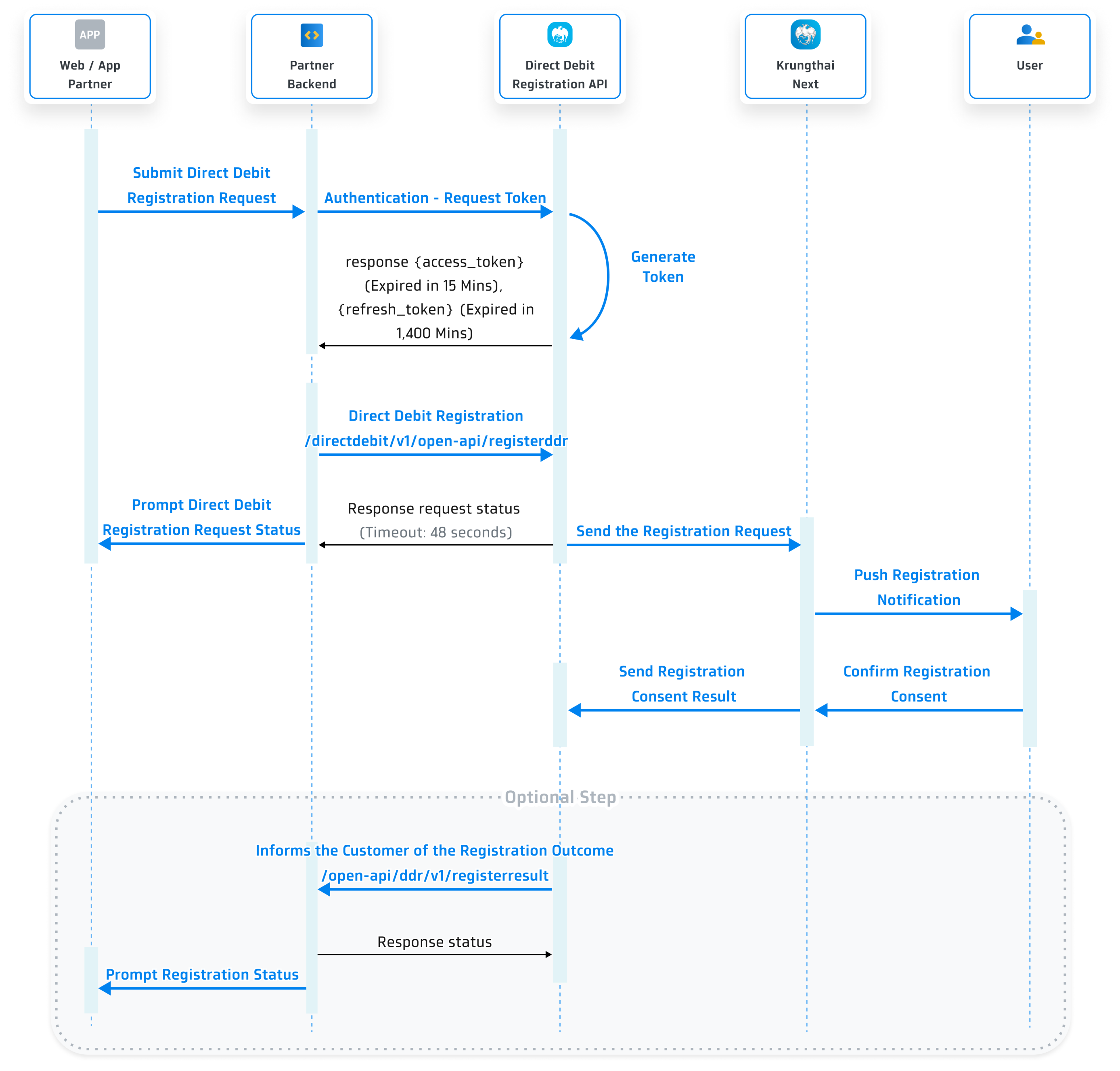
Sequence Diagram
Step 1 Get Client ID and Client Secret
You need to provide the following information on Krungthai Developers Console in order to get the client ID and client secret.
- Provide an application name.
- Provide a logo.
Remarks:
- Image should be a circle shape. If not, it will be adjusted to a circle.- Resolution must be 192x192 px.- File size must NOT exceed 50 KB.- File format must be .png. - Choose an API product.
- Choose 'Direct Debit Registration'.
- Provide a callback URL for receiving registration outcomes.
- Enter your IP addresses as verification is required for some API products. Click here to check the list of API products on 'Step 2 Create Your Application'.
Once registered, you will receive this following information for API integration.
- client ID
- client secret
- X-API-KEY, if your system requires this key for authenticate the callback
Step 2 Customer Completes The Authentication Process
In this step, you have to submit a request for an access_token to call Direct Debit Registration service. For more information, please read below.
Request
| Parameter | Type | Required | Description |
|---|---|---|---|
| Content-Type | string | Required | application/x-www-form-urlencoded |
| client_id | string | Required | The client ID is obtained once you have created your application in Krungthai Developer Console. |
| client_secret | string | Required | The client secret is obtained once you have created your application in Krungthai Developer Console. |
Example request:
curl --location --request POST '{{baseUrl}}/oauth/authentication/api/v2/token' \
--header 'Content-Type: application/x-www-form-urlencoded' \
--data-urlencode 'client_id=f79aa1fa-ba1e-464c-8a79-aacb8e4da725' \
--data-urlencode 'client_secret=f79aa1fa-ba1e-464c-8a79-aacb8e4da725' \
Response
| Property | Type | Description |
|---|---|---|
| code | string | Response code 0000 means success, otherwise means some error occurred. |
| message | string | If code = 0000, it will be Success, otherwise will show the description of how it failed. |
| data | object | List of token details. Please refer to data. |
| data | ||
| token_type | string | Bearer |
| access_token | string | Access token. It is valid for 15 Minutes. |
| expires_in | timestamp | Amount of time in seconds until the access token expires. It is valid for 900 Seconds / 15 Minutes. |
| refresh_token | string | A token used to get a new access token. It is valid for 1,440 Minutes after the access token issued. |
| refresh_token_expires_in | timestamp | Amount of time in seconds until the refresh token expires. It is valid for 86,400 Seconds / 1,440 Minutes. |
Example response:
{
  "code": "0000",
  "message": "Success",
  "data": {
    "token_type": "BEARER",
    "access_token": "eyJhb**2aA11",
    "expires_in": 900,
    "refresh_token": "eyJhb**2aA55",
    "refresh_token_expires_in": 86400
  }
}
Authentication Status Code
| code | message | Description |
|---|---|---|
| 0000 | Success | - |
| TK001 | Authentication failed credential invalid. | Unauthorize |
| 9999 | - | Unknown exception |
Refresh Token
This allows partner’s application to have short-lived access_token without having to collect credentials every time one expires.
| Parameter | Type | Required | Description |
|---|---|---|---|
| Content-Type | string | Required | application/x-www-form-urlencoded |
| client_id | string | Required | The client ID is obtained once you have created your application in Krungthai Developer Console. |
| client_secret | string | Required | The client secret is obtained once you have created your application in Krungthai Developer Console. |
| grant_type | string | Required | The value of this field should always be "refresh_token" |
| refresh_token | string | Required | A refresh_token received from authentication. |
Example request:
curl --location --request POST '{{baseUrl}}/oauth/authentication/api/v2/token/refresh'\
--header 'Content-Type: application/x-www-form-urlencoded' \
--data-urlencode 'client_id=f79aa1fa-ba1e-464c-8a79-aacb8e4da725' \
--data-urlencode 'client_secret=f79aa1fa-ba1e-464c-8a79-aacb8e4da725' \
--data-urlencode 'grant_type=refresh_token' \
--data-urlencode 'refresh_token=eyJhb**2aA55' \
Example response:
{
  "code": "0000",
  "message": "Success",
  "data": {
    "token_type": "BEARER",
    "access_token": "eyJhb**2aA11",
    "expires_in": 900,
    "refresh_token": "eyJhb**2aA55",
    "refresh_token_expires_in": 86400
  }
}
Step 3 Customer Completes The Registration Process for Direct Debit
In order to register, the customer has to fill in their Krungthai account number and reference information.
HTTP Header
After the user finishes the authentication process, use the access token at the Header Bearer to call other standard service.
| Parameter | Description | |
|---|---|---|
| Content-Type | application/json | |
| Authorization | Authorization code used to get an access token which is valid for 15 minutes. | |
| msg-hdr | List of msg-hdr details. Please refer to msg-hdr | |
| digital-id | Unique customer digital identity on your system, e.g., national ID | |
| msg-hdr | ||
| ipAddress | Your IP Address | |
| requestUID | Reference ID for the request. Should be unique for each request. |
Request
| Parameter | Type | Required | Description |
|---|---|---|---|
| vendorID | string (10) | Required | Company code |
| companyID | string (15) | Required | Company ID |
| accountNo | string (13) | Required | Debit account no. (retail accounts only) |
| ref1 | string (20) | Optional | Reference number 1, e.g., mobile number |
| ref2 | string (20) | Optional | Reference number 2 |
| ref3 | string (20) | Optional | Reference number 3 |
| ref4 | string (20) | Optional | Reference number 4 |
Example request:
curl --location --request POST '{{baseUrl}}/directdebit/v1/open-api/registerddr' \
--header 'Content-Type: application/json' \
--header 'msg-hdr: {"ipAddress":"127.0.0.1","requestUID":"500000010930000001"}' \
--header 'Authorization: Bearer {access_token}' \
--header 'digital-id': '123456789' \
 {
      "vendorID": "001",
      "companyID": "AAAA000001",
      "accountNo": "0000119222",
      "ref1": "12345",
      "ref2": "12345",
      "ref3": "12345",
      "ref4": "12345"
}
Response
| Property | Type | Description |
|---|---|---|
| statusCode | string (5) | Registration status code |
| statusDesc | string (256) | Status Description |
| severity | string (10) | Types of status |
| requestUID | string (36) | Reference ID of a request |
| ddrOapiSeqId | BigDecimal | Reference ID that will return with a response when a request is successful |
Example request:
{
      "statusCode": "0",
      "statusDesc": "Success",
      "severity": "INFO",
      "requestUID": "500000010930000001",
      "ddrOapiSeqId": 123
}
Step 4 The Bank's System Informs The Partner's System of The Registration Status
If you prefer to receive the Direct Debit Registration status, please add our IP address to your whitelist to ensure that your system can receive a callback from our system. You will find the IP address later when creating an application on our Krungthai Developers website.
If a customer does not receive an API about the registration status within a specific timeframe, they can submit a new registration.
HTTP Header
| Parameter | Description | |
|---|---|---|
| Content-Type | application/json | |
| msg-hdr | List of msg-hdr details. Please refer to msg-hdr | |
| msg-hdr | ||
| channelId | Process request channel (provided by partner) | |
| oapi-client-id | You can obtain a Client ID after creating an application in Krungthai Developer Console. | |
| oapi-partner-id | Unique ID for each partner in the system. | |
| requestUID | Reference ID for the request. Should be unique for each request. | |
| requestDateTime | Requester Identifier Date and Time “YYYYMMDD HH:mm:ss” BKK Timezone | |
| x-api-key | API key for authenticating the callback request. Provided by the API provider. |
Request
| Parameter | Type | Required | Description |
|---|---|---|---|
| vendorId | string (10) | Required | Company code |
| companyId | string (15) | Required | Company ID |
| accountNo | string (13) | Required | Debit account no. (retail accounts only) |
| ref1 | string (20) | Optional | Reference number 1, e.g., mobile number |
| ref2 | string (20) | Optional | Reference number 2 |
| ref3 | string (20) | Optional | Reference number 3 |
| ref4 | string (20) | Optional | Reference number 4 |
| applyDtm | string (19) | Required |
Registration date and time Format: YYY-MM-DD HH:MM:SS BKK time zone |
| respCode | string (5) | Required |
Registration status code, which can be: I0000 = Success I0001 = Reject |
| respDesc | string (10) | Required | Registration status, which can be: Success Reject |
Example request:
curl --location --request POST '{{callbackUrl}}' \
--header 'Content-Type: application/json' \
--header 'msg-hdr: {"channelId":"DDR-OPEN-API", "oapi-client-id":"xxxxxxxx-xxxx-xxxx-xxxx-xxxxxxxxxxxx",
"oapi-partner-id":"xxxxxxxx-xxxx-xxxx-xxxx-xxxxxxxxxxxx", "requestUID":"500000010930000001",
requestDateTime":"YYYYMMDD HH:mm:ss", "x-api-key": "xxxxxxxxxxxxxxxxxxxxxxxxxxxxxxxx"}' \
 {
      "vendorId": "001",
      "companyId": "AAAA000001",
      "accountNo": "0000119222",
      "ref1": "12345",
      "ref2": "12345",
      "ref3": "12345",
      "ref4": "12345",
      "applyDtm": "20201102 11:22:33",
      "respCode": "I0000",
      "respDesc": "Success"
}
Response
| Property | Type | Description |
|---|---|---|
| statusCode | string (5) | Status Code |
| statusDesc | string (256) | Status Description |
| requestUID | string (36) | Reference ID for the request |
Example response:
{
  "statusCode": "0",
  "statusDesc": "Success",
  "requestUID": "500000010930000001",
}
Definitions of Direct Debit Registration Status Codes
Direct Debit Registration
| Status Code | Status Description | Case |
|---|---|---|
| 0 | Success | |
| AU00400 | Bad Request | |
| AU00401 | Unauthorized | |
| AU00003 | {0} is required | clientId is required |
| AU00004 | Invalid format, {0} | Invalid format, requestUID |
| SYS001 | System Error | |
| SYS002 | Adapter General Error. | |
| CMN001 | {0} is required | account is required |
| CMN002 | Invalid format {0} | Invalid format requestDateTime |
| CMN003 | Invalid {0} |
Invalid channelId Invalid requestDateTime |
| CMN004 | {0} must be numeric | accountNo must be numeric. |
| CMN005 | {0} is over max length {1} | accountNo is over max length (13) |
| BSN001 | Vendor Id Not Found | |
| BSN002 | Duplicate Transaction | |
| BSN003 | Transaction Failed | |
| BSN004 | Company Profile Not Found | |
| BSN005 | Company Id and Company Code already used. | |
| BSN006 | Partner Id Not Found | |
| BSN007 | Duplicate Request UID | |
| CBS001 | Invalid Account No | |
| CBS002 | Invalid Product Group | |
| CBS003 | Invalid Account Status | |
| 0429 | Exceed the request limit, please try again later after 1 hour | Exceed the limit for consuming API for registration |