Development Guidelines
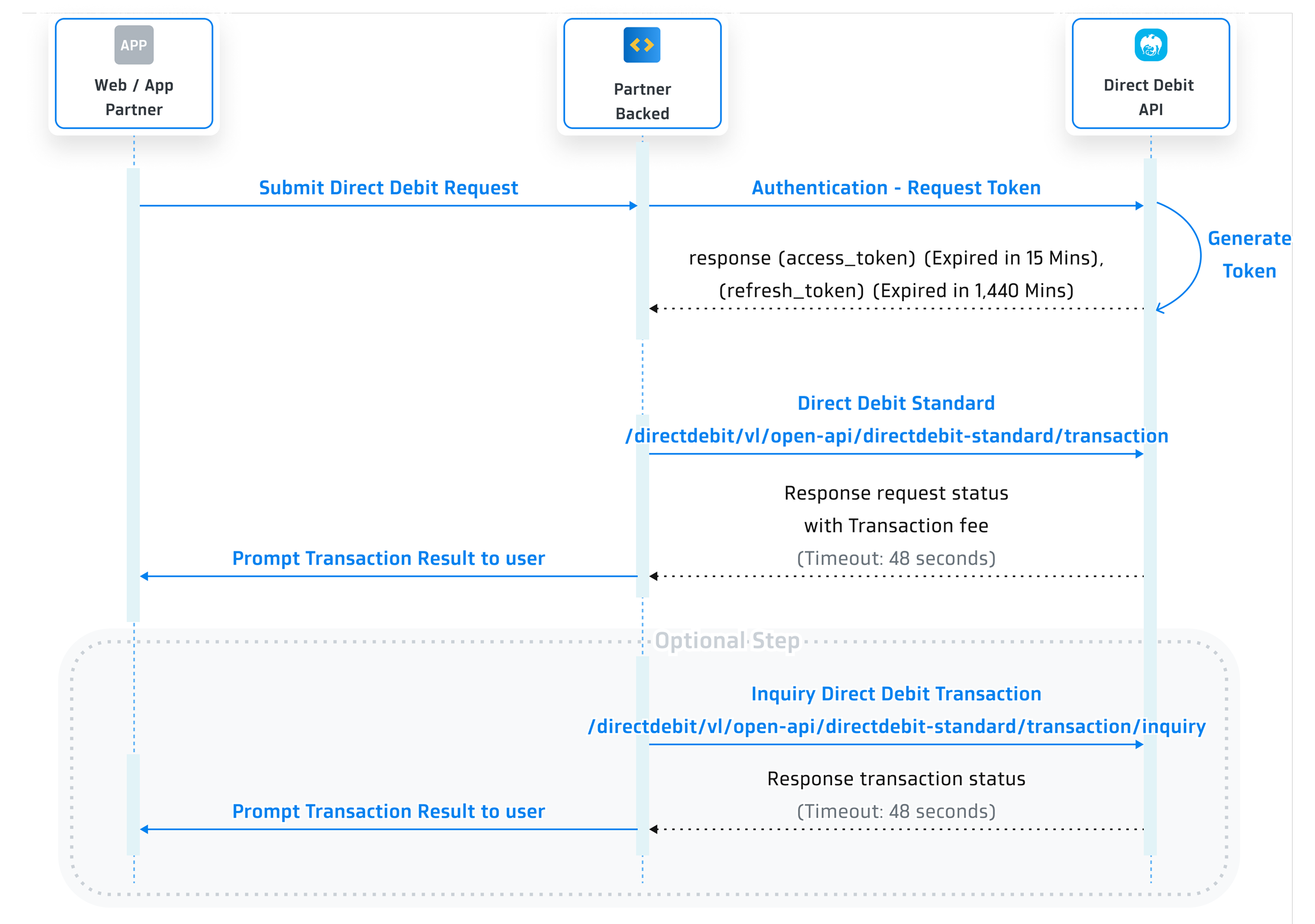
Sequence Diagram
Step 1 Get Client ID and Client Secret
You need to provide the following information on Krungthai Developers Console in order to get the client ID and client secret.
- Provide an application name.
- Provide a logo.
Remarks:
- Image should be a circle shape. If not, it will be adjusted to a circle.- Resolution must be 192x192 px.- File size must NOT exceed 50 KB.- File format must be .png. - Choose an API product.
- Choose 'Direct Debit'.
- Enter your IP addresses as verification is required for some API products. Click here to check the list of API products on 'Step 2 Create Your Application'.
Once registered, you will receive this following information for API integration.
- client ID
- client secret
Step 2 Initiate Authentication for Direct Debit Service
In this step, you will be sending request for the access_token used to call the Direct Debit Service. We will provide a detailed explanation of this process using the following information.
Request
| Parameter | Type | Required | Description |
|---|---|---|---|
| Content-Type | string | Required | application/x-www-form-urlencoded |
| client_id | string | Required | The client ID is obtained once you have created your application in Krungthai Developer Console. |
| client_secret | string | Required | The client secret is obtained once you have created your application in Krungthai Developer Console. |
Example request:
curl --location --request POST '{{baseUrl}}/oauth/authentication/api/v2/token' \
--header 'Content-Type: application/x-www-form-urlencoded' \
--data-urlencode 'client_id=f79aa1fa-ba1e-464c-8a79-aacb8e4da725' \
--data-urlencode 'client_secret=f79aa1fa-ba1e-464c-8a79-aacb8e4da725' \
Response
| Property | Type | Description |
|---|---|---|
| code | string | Response code 0000 means success, otherwise means some error occurred. |
| message | string | If code = 0000, it will be Success, otherwise will show the description of how it failed. |
| data | object | List of token details. Please refer to data. |
| data | ||
| token_type | string | Bearer |
| access_token | string | Access token. It is valid for 15 Minutes. |
| expires_in | timestamp | Amount of time in seconds until the access token expires. It is valid for 900 Seconds / 15 Minutes. |
| refresh_token | string | A token used to get a new access token. It is valid for 1,440 Minutes after the access token issued. |
| refresh_token_expires_in | timestamp | Amount of time in seconds until the refresh token expires. It is valid for 86,400 Seconds / 1,440 Minutes. |
Example response:
{
  "code": "0000",
  "message": "Success",
  "data": {
    "token_type": "BEARER",
    "access_token": "eyJhb**2aA11",
    "expires_in": 900,
    "refresh_token": "eyJhb**2aA55",
    "refresh_token_expires_in": 86400
  }
}
Authentication Status Code
| code | message | Description |
|---|---|---|
| 0000 | Success | - |
| TK001 | Authentication failed token invalid. | Unauthorize |
| 9999 | - | Unknown exception |
Refresh Token
This allows partner’s application to have short-lived access_token without having to collect credentials every time one expires.
| Parameter | Type | Required | Description |
|---|---|---|---|
| Content-Type | string | Required | application/x-www-form-urlencoded |
| client_id | string | Required | The client ID is obtained once you have created your application in Krungthai Developer Console. |
| client_secret | string | Required | The client secret is obtained once you have created your application in Krungthai Developer Console. |
| grant_type | string | Required | The value of this field should always be "refresh_token" |
| refresh_token | string | Required | A refresh_token received from authentication. |
Example request:
curl --location --request POST '{{baseUrl}}/oauth/authentication/api/v2/token/refresh'\
--header 'Content-Type: application/x-www-form-urlencoded' \
--data-urlencode 'client_id=f79aa1fa-ba1e-464c-8a79-aacb8e4da725' \
--data-urlencode 'client_secret=f79aa1fa-ba1e-464c-8a79-aacb8e4da725' \
--data-urlencode 'grant_type=refresh_token' \
--data-urlencode 'refresh_token=eyJhb**2aA55' \
Example response:
{
  "code": "0000",
  "message": "Success",
  "data": {
    "token_type": "BEARER",
    "access_token": "eyJhb**2aA11",
    "expires_in": 900,
    "refresh_token": "eyJhb**2aA55",
    "refresh_token_expires_in": 86400
  }
}
Step 3 Initiate Transaction for Direct Debit Service
The system will always verify the consent before debiting from your client account, and a detailed description of this process is provided in the following information.
HTTP Header
After the user finishes the authentication process, use the access token at the Header Bearer to call other standard service.
| Parameter | Description |
|---|---|
| Content-Type | application/json |
| Authorization | Authorization code used to get an access token which is valid for 15 minutes. |
| x-request-id | This field is optional. Data must be in UUID format. |
Request
| Parameter | Type | Required | Description |
|---|---|---|---|
| resMsgHeader | Object | Required | List of request ID. Please refer to resMsgHeader |
| reqDirectDebitStd | Object | Required | List of direct debit service. Please refer to reqDirectDebitStd |
| resMsgHeader | |||
| requestId | string (20) | Required | Reference ID for the request. |
| requestDateTime | string (17) | Required | Requester Identifier Date and Time “YYYYMMDD HH:mm:ss” BKK Timezone |
| reqDirectDebitStd | |||
| externalTxnId | string (20) | Required | Reference ID of client’s request. (provided by partner) |
| companyId | string (10) | Required | Company Id |
| ddrComCd | string (15) | Required | Company Code DDR for checking the consent to debit from account |
| txnDate | string (8) | Required |
Request Date. Format: “YYYYMMDD” Incase request time exceed system cut off time, the txnDate must be sent next day System Cut Off Time “UAT”: 17:00 ”Production”: 23:00 |
| ddrRef1 | string (20) | Optional | DDR Reference 1 |
| ddrRef2 | string (20) | Optional | DDR Reference 2 |
| debitAccountNo | string (15) | Required | Debit Account No. (Retail Account) |
| creditAccountNo | string (15) | Required | Receiver Account No. (Company Account) |
| debitAmount | Decimal | Required | Request transaction amount (2 precision) |
Example request:
curl --location --request POST '{{baseUrl}}/directdebit/v1/open-api/directdebit-standard/transaction' \
--header 'Content-Type: application/json' \
--header 'Authorization: Bearer {access_token}' \
--header 'x-request-id: xxxxxxxx-xxxx-xxxx-xxxx-xxxxxxxxxxxx' \
{
     "reqMsgHeader":  {
      "requestId": "1",
      "requestDateTime": "20201102 11:22:33"
      } ,
     "reqDirectDebitStd":  {
      "externalTxnId": "KTB20201102000001",
      "companyId": "AAAA000001",
      "ddrComCd": "0001",
      "txnDate": "20201102",
      "ddrRef1": "12345",
      "ddrRef2": "12345",
      "debitAccountNo": "0000119222",
      "creditAccountNo": "0000123456",
      "debitAmount": 10000.00
      }
}
Response
| Property | Type | Required | Description |
|---|---|---|---|
| resMsgHeader | Object | Required | Registration status code |
| resDirectDebitStd | Object | Required | List of direct debit service. Please refer to resDirectDebitStd |
| resMsgHeader | |||
| responseCode | string (5) | Required | Response Status Code (0 = Success) |
| responseMessage | string (256) | Required | Detail of Response Status |
| requestId | string (20) | Required | Reference ID for the request. |
| requestDateTime | string (17) | Required | Requester Identifier Date and Time “YYYYMMDD HH:mm:ss” BKK Timezone |
| resDirectDebitStd | |||
| externalTxnId | string (20) | Required | Reference ID of client’s request. (provided by partner) |
| companyId | string (10) | Required | Company ID |
| ddrComCd | string (15) | Required | Company Code DDR for checking the consent to debit from account |
| txnDate | string (8) | Required | Request Date. Format: “YYYYMMDD” |
| debitAccountNo | string (15) | Required | Debit Account No. (Retail Account) |
| creditAccountNo | string (15) | Required | Receiver Account No. (Company Account) |
| debitAmount | Decimal | Required | Request transaction amount (2 precision) |
| feeChargeFrom | String (3) | Required | Transaction fee will be charged from retail customer or company |
| feeAmount | Decimal | Required | Amount of transaction fee |
Example request:
 {
     "resMsgHeader":  {
      "responseCode": "0",
      "responseMessage": "Direct debit standard success",
      "requestId": "1",
      "requestDateTime": "20201102 11:22:33"
      } ,
     "resDirectDebitStd":  {
      "externalTxnId": "KTB20201102000001",
      "companyId": "AAAA000001",
      "ddrComCd": "0001",
      "txnDate": "20201102",
      "debitAccountNo": "0000119222",
      "creditAccountNo": "0000123456",
      "feeChargeFrom": "OUR",
      "feeAmount": 10.00
      }
}
Step 4 Inquiry Direct Debit Transaction Service
- Incase inquiry more than 2 minute after exchange token for Direct Debit service, and response show “PRCS”. Please inform the bank to investigate
- Incase inquiry and response show “FAIL”, the system already reverse the transaction. You can check transaction status from financialReverseStatus
- Incase status = “PRCS”. The system will retry reversing every 30 minutes until 23:50
- Incase status = “NO-TXN”. The system try to reverse transaction but there is no debit at client’s account (End Status)
- Incase status = “FAIL”. The system cannot get internal status. Please inform the bank to investigate (End Status)
In this step, we will guide you on how to inquiry Direct Debit Transaction service. To proceed, you will need to provide the following information as outlined below.
HTTP Header
After the user finishes the authentication process, use the access token at the Header Bearer to call other standard service.
| Parameter | Description |
|---|---|
| Content-Type | application/json |
| Authorization | Authorization code used to get an access token which is valid for 15 minutes. |
| x-request-id | This field is optional. Data must be in UUID format. |
Request
| Parameter | Type | Required | Description |
|---|---|---|---|
| reqMsgHeader | Object | Required | List of request ID. Please refer to reqMsgHeader |
| reqInquiryDdbTxn | Object | Required | List of inquiry direct debit transaction service. Please refer to reqInquiryDdbTxn |
| reqMsgHeader | |||
| requestId | string (20) | Required | Reference ID for the request. |
| requestDateTime | string (17) | Required | Requester Identifier Date and Time “YYYYMMDD HH:mm:ss” BKK Timezone |
| reqInquiryDdbTxn | |||
| externalTxnId | string (20) | Required | Reference ID of client’s request. (provided by partner) |
| companyId | string (10) | Required | Company ID |
| ddrComCd | string (15) | Required | Company Code DDR for checking the consent to debit from account |
| txnDate | string (8) | Required | Request Date. Format: “YYYYMMDD” |
Example request:
curl --location --request POST '{{baseUrl}}/directdebit/v1/open-api/directdebit-standard/transaction/inquiry' \
--header 'Content-Type: application/json' \
--header 'Authorization: Bearer {access_token}' \
--header 'x-request-id: xxxxxxxx-xxxx-xxxx-xxxx-xxxxxxxxxxxx' \
 {
     "reqMsgHeader":  {
      "requestId": "1",
      "requestDateTime": "20201102 11:22:33"
      } ,
     "reqInquiryDdbTxn":  {
      "externalTxnId": "KTB20201102000001",
      "companyId": "AAAA000001",
      "ddrComCd": "0001",
      "txnDate": "20201102"
      }
}
Response
| Property | Type | Required | Description |
|---|---|---|---|
| resMsgHeader | Object | Required | List of request header. Please refer to resMsgHeader |
| resInquiryDdbTxn | Object | Required | List of inquiry direct debit service. Please refer to resInquiryDdbTxn |
| resMsgHeader | |||
| responseCode | string (5) | Required | Response Status Code (0 = Success) |
| responseMessage | string (256) | Required | Detail of Response Status |
| requestId | string (20) | Required | Reference ID for the request. |
| requestDateTime | string (17) | Required | Requester Identifier Date and Time “YYYYMMDD HH:mm:ss” BKK Timezone |
| resInquiryDdbTxn | |||
| companyId | string (10) | Required | Company ID |
| ddrComCd | string (15) | Required | Company Code DDR for checking the consent to debit from account |
| externalTxnId | string (20) | Required | Reference ID of client’s request. (provided by partner) |
| txnDate | string (8) | Required | Request Date. Format: “YYYYMMDD” |
| txnStatus | string (10) | Required |
Transaction Status “CMPLT” : SUCCESS “PRCS” : PROCESSING “FAIL” : FAILED Note: |
| responseCode | string (5) | Required | Response Status Code (0 = Success) |
| responseMessage | string (256) | Required | Detail of Response Status |
| feeChargeFrom | String (3) | Required | Transaction fee will be charged from retail customer or company |
| feeAmount | Decimal | Required | Amount of transaction fee |
| debitAmount | Decimal | Required | Request transaction amount (2 precision) |
| financialReverseStatus | string (10) | Required |
Refund Status to Debit Account “CMPLT” : Refund Successful “PRCS” : Processing “NO-TXN” : No debit client’s account “FAIL” : Failed Note: |
Example response:
 {
     "resMsgHeader":  {
      "responseCode": "0",
      "responseMessage" : "Inquiry direct debit transaction success",
      "requestId": "1",
      "requestDateTime": "20201102 11:22:33"
      } ,
     "resInquiryDdbTxn":  {
      "companyId": "AAAA000001",
      "ddrComCd": "0001",
      "externalTxnId": "202011020000000001",
      "txnDate": "20201102",
      "txnStatus": "CMPLT",
      "responseCode": "0",
      "responseMessage" : "Direct debit standard success",
      "feeChargeFrom": "BEN",
      "feeAmount": 10.00,
      "debitAmount": 10000.00,
      "financialReverseStatus": "CMPLT"
      }
}
Definitions of Response Codes
Response Codes
| Response Code | Status Description | Debit Status | Note |
|---|
Response Codes starting with SYS
| SYS000 | System Error | N | Inform Bank to investigate |
| SYS001 | Invalid Message Format | N | Recheck requested message that is sent to Bank |
| SYS101 | Adapter General Error | N | Inform the Bank to investigate |
| SYS102 | Other Error from Bankend System | N | Inform the Bank to investigate |
| SYS103 | Cannot update status after post CBS transaction | N/A | Inform the Bank to investigate and update transaction status |
| SYS400 | Bad Request | N | Recheck requested message that is sent to Bank |
| SYS401 | Unauthorized Service | N | Inform the Bank to investigate and update transaction status (Company ID and User Authen are not linked) |
| SYS404 | Invalid Request Path | N | Recheck URL sent to the Bank |
Response Codes starting with BSN
| BSN001 | Duplicate Transaction | N | Recheck External ID + txn. ID + Comp ID + Comp Code + Transaction date. Should not sent before |
| BSN002 | DDR company code is not registered | N | Inform the Bank to investigate and update transaction status (DDR Company Code and Company ID are not linked) |
| BSN003 | Requested Transaction Date must not be in the past Date or Future Date | N | Recheck Transaction Date sent to the Bank |
| BSN004 | Transaction Failed | N/A | Inform the Bank to investigate and update transaction status |
| BSN005 | Customer does not register direct debit | N | Recheck DDR service application status from both Company and Bank |
| BSN007 | Invalid Credit Account No | N | Inform the Bank to investigate and update transaction status |
| BSN008 | Transaction not found | N | Recheck External ID + txn. ID + Comp ID + Comp Code + Transaction date. Should not sent before |
| BSN011 | Transaction Amount is over limit | N | Transaction is exceed the limit in company profile |
| BSN012 | Out of service | N | Transaction is exceed the Cut off Time in company profile |
Response Codes starting with CBS
| CBS000 | Core Banking Other Error | N | Inform the Bank to investigate and update transaction status |
| CBS001 | Insufficient Funds | N | Inform the client to check Account Balance |
| CBS002 | Invalid FROM account number | N | Inform the client to check Debit Account No. |
| CBS003 | CBS: Restriction placed on account | N | Inform the client to check source account and destination account |
| CBS004 | Account status is close | N | Account status is close |
| DDR000 | DDR Profile is invalid | N | Inform the Bank to investigate and update transaction status |