Development Guidelines
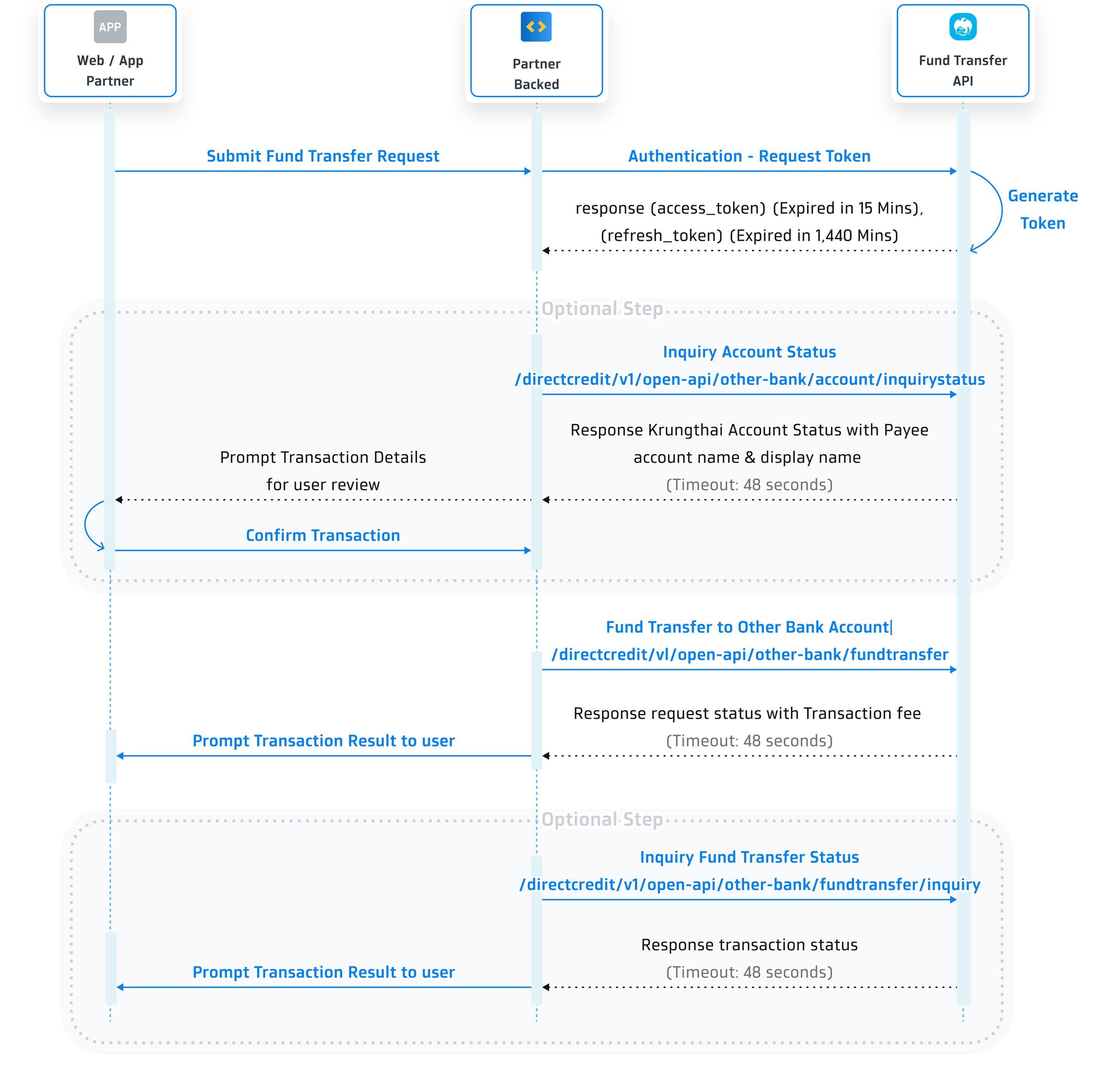
Sequence Diagram
Step 1 Get Client ID and Client Secret
You need to provide the following information on Krungthai Developers Console in order to get the client ID and client secret.
- Provide an application name.
- Provide a logo.
Remarks:
- Image should be a circle shape. If not, it will be adjusted to a circle.- Resolution must be 192x192 px.- File size must NOT exceed 50 KB.- File format must be .png. - Choose an API product.
- Choose 'Fund Transfer to Other Bank'.
- Enter your IP addresses as verification is required for some API products. Click here to check the list of API products on 'Step 2 Create Your Application'.
Once registered, you will receive this following information for API integration.
- client ID
- client secret
Step 2 Initiate Authentication for Fund Transfer to Other Bank Account Service
In this step, you will be sending request for the access_tokenused to call the Fund Transfer to Other Bank Account Service. We will provide a detailed explanation of this process using the following information.
Request
| Parameter | Type | Required | Description |
|---|---|---|---|
| Content-Type | string | Required | application/x-www-form-urlencoded |
| client_id | string | Required | The client ID is obtained once you have created your application in Krungthai Developer Console. |
| client_secret | string | Required | The client secret is obtained once you have created your application in Krungthai Developer Console. |
Example request:
curl --location --request POST '{{baseUrl}}/oauth/authentication/api/v2/token' \
--header 'Content-Type: application/x-www-form-urlencoded' \
--data-urlencode 'client_id=f79aa1fa-ba1e-464c-8a79-aacb8e4da725' \
--data-urlencode 'client_secret=f79aa1fa-ba1e-464c-8a79-aacb8e4da725' \
Response
| Property | Type | Description |
|---|---|---|
| code | string | Response code 0000 means success, otherwise means some error occurred. |
| message | string | If code = 0000, it will be Success, otherwise will show the description of how it failed. |
| data | object | List of token details. Please refer to data. |
| data | ||
| token_type | string | Bearer |
| access_token | string | Access token. It is valid for 15 Minutes. |
| expires_in | timestamp | Amount of time in seconds until the access token expires. It is valid for 900 Seconds / 15 Minutes. |
| refresh_token | string | A token used to get a new access token. It is valid for 1,440 Minutes after the access token issued. |
| refresh_token_expires_in | timestamp | Amount of time in seconds until the refresh token expires. It is valid for 86,400 Seconds / 1,440 Minutes. |
Example response:
{
  "code": "0000",
  "message": "Success",
  "data": {
    "token_type": "BEARER",
    "access_token": "eyJhb**2aA11",
    "expires_in": 900,
    "refresh_token": "eyJhb**2aA55",
    "refresh_token_expires_in": 86400
  }
}
Authentication Status Codes
| code | message | Description |
|---|---|---|
| 0000 | Success | - |
| TK001 | Authentication failed credential invalid. | Unauthorize |
| 9999 | - | Unknown exception |
Refresh Token
This allows partner’s application to have short-lived access_token without having to collect credentials every time one expires.
Request
| Parameter | Type | Required | Description |
|---|---|---|---|
| Content-Type | string | Required | application/x-www-form-urlencoded |
| client_id | string | Required | The client ID is obtained once you have created your application in Krungthai Developer Console. |
| client_secret | string | Required | The client secret is obtained once you have created your application in Krungthai Developer Console. |
| grant_type | string | Required | The value of this field should always be "refresh_token" |
| refresh_token | string | Required | A refresh_token received from authentication. |
Example request:
curl --location --request POST '{{baseUrl}}/oauth/authentication/api/v2/token/refresh'\
--header 'Content-Type: application/x-www-form-urlencoded' \
--data-urlencode 'client_id=f79aa1fa-ba1e-464c-8a79-aacb8e4da725' \
--data-urlencode 'client_secret=f79aa1fa-ba1e-464c-8a79-aacb8e4da725' \
--data-urlencode 'grant_type=refresh_token' \
--data-urlencode 'refresh_token=eyJhb**2aA55' \
Example response:
{
  "code": "0000",
  "message": "Success",
  "data": {
    "token_type": "BEARER",
    "access_token": "eyJhb**2aA11",
    "expires_in": 900,
    "refresh_token": "eyJhb**2aA55",
    "refresh_token_expires_in": 86400
  }
}
Step 3 Inquiry Account Status Service
This step is optional. Developers can use this query to validate the payee's account status.
The system verifies the information of the destination account to ensure its validity. By fetching the account details from the database, the system confirms the existence of the account. A detailed explanation of this process will be provided using the following information.
HTTP Header
After the user finishes the authentication process, use the access token at the Header Bearer to call other standard service.
| Parameter | Description |
|---|---|
| Content-Type | application/json |
| Authorization | Authorization code used to get an access token which is valid for 15 minutes. |
| x-request-id | This field is optional. Data must be in UUID format. |
Request
| Parameter | Type | Required | Description |
|---|---|---|---|
| channelID | string (10) | Required | Process request channel (provided by partner) |
| termID | string (20) | Required | Terminal ID (provided by Krungthai Bank) |
| tranDate | string (8) | Required | Requester Identifier Date "YYYYMMDD" |
| tranTime | string (8) | Required | Requester Identifier Time "HH:mm:ss" (24Hr) |
| compId | string (10) | Required | Company ID |
| requestUID | string (20) | Required | Reference ID for the request. Should be unique for each request. |
| payerBankCode | string (3) | Required | Payer Bank Code. Fixed = 006 (Krungthai Bank Code) |
| payerAccount | string (15) | Required | Payer Account No. System will validate the A/C Account that partner provide in registered company ID |
| payeeBankCode | string (3) | Required | Payee Bank Code. If transfer to other bank account, input destination account's Bank Code. |
| payeeAccount | string (15) | Required | Payee Account No |
| payeeName | string (160) | Optional | If payeeName is provided when transfer to other bank account, System will validate the payeeName with Account Name provided by other bank. (Payee Account Name must be in English only.) |
| citizenId | string (20) | Optional | Payee Citizen ID |
Example request:
curl --location --request POST '{{baseUrl}}/directcredit/v1/open-api/other-bank/account/inquirystatus' \
--header 'Content-Type: application/json' \
--header 'Authorization: Bearer {access_token}' \
--header 'x-request-id: xxxxxxxx-xxxx-xxxx-xxxx-xxxxxxxxxxxx' \
{
  "channelID": "XXX",
  "termID": "KTB-XXX",
  "tranDate": "20181018",
  "tranTime": "12:30:15",
  "compId": "ABCD000001",
  "requestUID": "400000010930000001",
  "payerBankCode": "006",
  "payerAccount": "0000345924",
  "payeeBankCode": "006",
  "payeeAccount": "0000345924",
  "payeeName": "NAME LASTNAME",
  "citizenId": "1234567890123"
}
Response
| Property | Type | Description |
|---|---|---|
| statusCode | string (5) |
Status Code "IC001" - Active is when Account is available to receive transaction (Account Status = Active, unclaimed) Account Group : Saving & Current. "EV033" - Inactive is when Account is unavailable to receive transaction "EV006" - Payee account not found or etc. |
| statusDesc | string (256) | Status Description |
| severity | string (10) | Severity Status. Detail of request status. |
| payeeName | string (160) | Payee Name in English. |
| displayPayeeName | string (160) | Payee Name in Thai. |
| requestUID | string (20) | Reference ID for the request. Similar to Request. |
Example response:
{
  "statusCode": "IC001",
  "statusDesc": "Success",
  "severity": "INFO",
  "payeeName": "NAME LASTNAME",
  "displayPayeeName": "ชื่อ นามสกุล",
  "requestUID": "400000010930000001"
}
Step 4 Initiate Fund Transfer to Other Bank Account Service
This step can be utilized by developers to handle the transaction processing.
The system will conduct a verification of the recipient's account details before initiating the money transfer. The particulars of this procedure can be broken down as follows.
HTTP Header
After the user finishes the authentication process, use the access token at the Header Bearer to call other standard service.
| Parameter | Description |
|---|---|
| Content-Type | application/json |
| Authorization | Authorization code used to get an access token which is valid for 15 minutes. |
| x-request-id | This field is optional. Data must be in UUID format. |
Request
| Parameter | Type | Required | Description |
|---|---|---|---|
| channelID | string (10) | Required | Process request channel (provided by partner) |
| termID | string (20) | Required | Terminal ID (provided by Krungthai Bank) |
| tranDate | string (8) | Required | Requester Identifier Date "YYYYMMDD" |
| tranTime | string (8) | Required | Requester Identifier Time "HH:mm:ss" (24Hr) |
| compId | string (10) | Required | Company ID |
| requestUID | string (20) | Required | Reference ID for the request. Should be unique for each request. |
| transRefNo | string (20) | Required | The Requester Identifier must be unique for this service. Typically, the system checks for duplicate transRefNo values (Check Dup) used on the same day by verifying the CompanyID, TermID, TransRefNo, and CreateDate values. |
| tranAmount | string (17) | Required | Request transaction amount (15 digits + 2 precision) |
| payerBankCode | string (3) | Required | Payer Bank Code. Fixed = 006 (Krungthai Bank Code) |
| payerAccount | string (15) | Required | Payer Account No. System will validate the A/C Account that partner provide in registered company ID |
| payeeBankCode | string (3) | Required | Payee Bank Code. If transfer to other bank account, input destination account's Bank Code. |
| payeeAccount | string (15) | Required | Payee Account No |
| payeeName | string (160) | Optional | If payeeName is provided when transfer to other bank account, System will validate the payeeName with Account Name provided by other bank. (Payee Account Name must be in English only.) |
| citizenId | string (20) | Optional | Payee Citizen ID |
| resendFlag | string (1) | Required | "N" = Normal transaction |
| reference1 | string (20) | Optional | Reference 1 |
| reference2 | string (20) | Optional | Reference 2 |
Example request:
curl --location --request POST '{{baseUrl}}/directcredit/v1/open-api/other-bank/fundtransfer' \
--header 'Content-Type: application/json' \
--header 'Authorization: Bearer {access_token}' \
--header 'x-request-id: xxxxxxxx-xxxx-xxxx-xxxx-xxxxxxxxxxxx' \
{
  "channelID": "XXX",
  "termID": "KTB-XXX",
  "tranDate": "20181018",
  "tranTime": "12:30:15",
  "compId": "ABCD000001",
  "requestUID": "500000010930000001",
  "transRefNo": "202306301546",
  "tranAmount": "200000.00",
  "payerBankCode": "006",
  "payerAccount": "0000345924",
  "payeeBankCode": "004",
  "payeeAccount": "0040345924",
  "payeeName": "NAME LASTNAME",
  "citizenId": "1234567890123",
  "resendFlag": "N",
  "reference1": "1234567890123",
  "reference2": "1234567890123"
}
Response
| Property | Type | Description |
|---|---|---|
| statusCode | string (5) | Status Code |
| statusDesc | string (256) | Status Description |
| severity | string (10) | Severity Status. Detail of request status. |
| requestUID | string (20) | Reference ID for the request. Similar to Request. |
| transRefNo | string (20) | Requester Identifier must be unique in this service. Similar to Request. |
| sysRefNo | string (20) | Backend Transaction Reference No |
| transFee | string (17) | Transaction fee charge |
| reference1 | string (20) | Reference 1 |
| reference2 | string (20) | Reference 2 |
Example response:
{
"statusCode": "IC000",
"statusDesc": "Payment is Executed Successfully",
"severity": "INFO",
"requestUID": "500000010930000001",
"transRefNo": "202306301546",
"sysRefNo": "12345",
"transFee": "15.00",
"reference1": "1234567890123",
"reference2": "1234567890123"
}
Step 5 Inquiry Fund Transfer to Other Bank Account Status Service
In this step, we will explain the optional process to investigate transaction status. We will provide a detailed explanation using the following information.
HTTP Header
After the user finishes the authentication process, use the access token at the Header Bearer to call other standard service.
| Parameter | Description |
|---|---|
| Content-Type | application/json |
| Authorization | Authorization code used to get an access token which is valid for 15 minutes. |
| x-request-id | This field is optional. Data must be in UUID format. |
Request
| Parameter | Type | Required | Description |
|---|---|---|---|
| channelID | string (10) | Required | Process request channel (provided by partner) |
| termID | string (20) | Required | Terminal ID (provided by Krungthai Bank) |
| tranDate | string (8) | Required | Requester Identifier Date "YYYYMMDD" |
| tranTime | string (8) | Required | Requester Identifier Time "HH:mm:ss" (24Hr) |
| compId | string (10) | Required | Company ID |
| transRefNo | string (20) | Required | Requester Identifier must be unique in this service. |
| requestUID | string (20) | Required | Reference ID for the request. Should be unique for each request. |
| transferType | string (10) | Optional | Transfer Type |
Example request:
curl --location --request POST '{{baseUrl}}/directcredit/v1/open-api/other-bank/fundtransfer/inquiry' \
--header 'Content-Type: application/json' \
--header 'Authorization: Bearer {access_token}' \
--header 'x-request-id: xxxxxxxx-xxxx-xxxx-xxxx-xxxxxxxxxxxx' \
{
 "channelID": "XXX",
  "termID": "KTB-XXX",
  "tranDate": "20181018",
  "tranTime": "12:30:15",
  "compId": "ABCD000001",
  "transRefNo": "202306301545",
  "requestUID": "600000010930000001",
  "transferType": ""
}
Response
| Property | Type | Description |
|---|---|---|
| statusCode | string (5) | Status Code |
| statusDesc | string (256) | Status Description |
| severity | string (10) | Severity Status. Detail of request status. |
| requestUID | string (20) | Reference ID for the request. Similar to Request. |
| fundTfrinfoList | list | List of fund transfer details. Please refer to fundTfrinfoList. |
| fundTfrInfoList | ||
| tranDate | string (8) | Transaction Date "YYYYMMDD" |
| tranTime | string (8) | Transaction Time "HH:mm:ss" (24Hr) |
| transRefNo | string (20) | Requester Identifier must be unique in this service. Similar to Query. |
| sysRefNo | string (20) | Backend Transaction Reference No |
| tranStatusCode | string (10) | Fund Transfer Status |
| tranStatusDesc | string (100) | Transaction Status Desc |
| statusCode | string (5) | Status Code from fund transfer status |
| statusDesc | string (256) | Status Description from fund transfer status |
| reference1 | string (20) | Reference 1 |
| reference2 | string (20) | Reference 2 |
Example response (Success):
{
  "statusCode": "IC001",
  "statusDesc": "Inquiry Successful",
  "severity": "INFO",
  "requestUID": "600000010930000001",
  "fundTfrInfoList": [
    {
      "tranDate": "20181018",
      "tranTime": "12:30:15",
      "transRefNo": "202306301546",
      "sysRefNo": "12345",
      "tranStatusCode": "010004",
      "tranStatusDesc": "COMPLETE",
      "statusCode": "IC000",
      "statusDesc": "Payment is Executed Successfully",
      "reference1": "1234567890123",
      "reference2": "1234567890123"
    }
  ]
}
Example response (Failed):
{
  "statusCode": "IC001",
  "statusDesc": "Inquiry Successful",
  "severity": "INFO",
  "requestUID": "202607021430391782",
  "fundTfrInfoList": [
    {
      "tranDate": "20260702",
      "tranTime": "14:30:03",
      "transRefNo": "20260702142959297",
      "sysRefNo": "26070214300144093338",
      "tranStatusCode": "030002",
      "tranStatusDesc": "VALIDATE FAILED",
      "statusCode": "EV033",
      "statusDesc": "Payee account invalid",
      "reference1": "1234567890123",
      "reference2": "1234567890123"
    }
  ]
}
Step 6 Get the Reconcile File
Partners can simply download a reconciliation file in .csv format by calling a specific API for each product. Descriptions of the fields in the reconciliation file are provided below.
| Parameter | Description |
|---|---|
| Content-Type | application/json |
| Authorization | Authorization code used to get an access token, which is valid for 15 minutes. |
| x-request-id | Optional field. Data must be in UUID format. |
Request
| Parameter | Type | Required | Description |
|---|---|---|---|
| Date | string | Required | Transaction date in "YYYY-MM-DD" format |
| companyID | string | Optional |
The company ID that you request a reconcile file for. Remark: If you need a reconcile file that includes all of your company IDs, leave this field blank. |
Example request:
curl --location --request POST '{{baseUrl}}/directcredit/v1/open-api/other-bank/signed-url-reconcile-file' \
--header 'Content-Type: application/json' \
--header 'Authorization: Bearer {access_token}' \
--header 'x-request-id: xxxxxxxx-xxxx-xxxx-xxxx-xxxxxxxxxxxx' \
--data '{
  "date": "2023-10-27",
  "companyID": "OAPI123456"
}'
Responses
| Property | Type | Description |
|---|---|---|
| statusCode | string | Status code |
| statusDesc | string | Status description |
| gcsSignedUrl | string | Signed URL for downloading the reconcile file |
| unZipKey | string | Key to decrypt the reconcile file |
Example response:
{
  "statusCode": "0",
  "statusDesc": "Success",
  "gcsSignedUrl": "www.example.com/sample?abc=123",
  "unZipKey": "XXXX"
}
Reconcile File Status Codes
| Code | Message | Description |
|---|---|---|
| 0 | Success | - |
| AU00001 | Invalid Message Format | The input data is in a wrong format |
| AU00002 | File not Found | The reconcile file of the input date cannot be found |
| AU00003 | Invalid CompanyID Format | The input companyID is in a wrong format |
.CSV File Format
A reconcile file's name can come in one of these formats:
If a company ID has been specified: PartnerID_CompanyID_"OFFUS"_yyyymmdd.csv
If no company ID has been specified: PartnerID_"OFFUS"_yyyymmdd.csv
The reconcile report in this file format includes the following fields:
| No. | Field Name | Description |
|---|---|---|
| 1 | NO | Number of Record |
| 2 | EFFECTIVE DATE | Transaction Effective Date (YYYYMMDD) |
| 3 | TRANSREF NO | TransRef No |
| 4 | SYS REF NO | Backend Transaction Reference No |
| 5 | CHANNEL ID | Process Request Channel |
| 6 | PAYER ACCOUNT | Payer Account Number (Withdrawal from Account) |
| 7 | PAYEE BANK | Payee Bank Code |
| 8 | PAYEE ACCOUNT | Payee Account Number (Deposit to Account) |
| 9 | PAYEE NAME (EN) | Payee Account Name (English) |
| 10 | PAYEE NAME (TH) | Payee Account Name (Thai) |
| 11 | REFERENCE1 | Reference1 |
| 12 | REFERENCE2 | Reference2 |
| 13 | AMOUNT | Credit Transaction Amount |
| 14 | FEE | Fee Charge Amount |
| 15 | NET AMOUNT | Net Amount |
| 16 | STATUS | Transaction Status |
| 17 | REASON CODE | Reason Code |
| 18 | REASON DESC | Reason Description |
| 19 | PARTNER ID | Open API Partner ID |
| 20 | CLIENT ID | Open API Client ID |
| 21 | COMPANY ID | Company ID |
| 22 | CHARGE TYPE | Transaction Fee Charge Type "Our" = The transaction fee will be charged to the payer "Ben" = The transaction fee will be charged to the payee (beneficiary) |
| 23 | EFFECTIVE TIME | Effective Time of Transaction |
Definitions of Fund Transfer Status Codes
Fund Transfer Codes
| Status Code | Status Description | Case | Note |
|---|---|---|---|
| PT001 | Invalid Message Format | - Verify that the Request field is required and must be within the specified data size. - Inquiry Account Status: Check Request if the destination PayeeBankCode is KTB (006). If CitizenID is specified, the system will validate the CitizenID of PayeeAccount. The bank must not match the value in the Request. |
Investigate and recheck HTTPS REQUEST Format with provided in the document |
| TM001 | After Hours : Web Service is closed. Open xx:xx - yy:yy | Send request in during the time the system is open for service. | |
| IC000 | Fund Transfer is Executed Successfully | ||
| IC001 | Inquiry Successful | ||
| ED001 | System Error | Inform Bank to investigate and fix the issue |
Status Codes Starting With EA
| EA001 | Other Error from Backend System | Inform Bank to investigate and fix the issue | |
| EA002 | An Exception is Encountered while Processing Your Request | Inform Bank to investigate and fix the issue | |
| EA003 | Adapter General Error | Inform Bank to investigate and fix the issue | |
| EA004 | An Exception is Encountered while Processing Your Request | Inform Bank to investigate and fix the issue |
Status Codes Starting With EM
| EM000 | An Exception is Encountered while Processing Your Request | Inform Bank to investigate and fix the issue | |
| EM001 | Duplicate transRefNo | Please recheck requested transRefno incoming | |
| EM002 | The company has not subscribed to the service | case of transferring funds within the bank, check the company profile is not found in system. – Fund Transfer Standard: In case of transferring funds within the bank, a subscription is required for Service: Fund Transfer to Own A/C and Fund Transfer to 3rd Party (KTB) / Promtpay. - In case of transferring funds to other banks, application for Service: Fund Transfer to Other Bank is required. |
Please Recheck CompanyID Profile for Registration use service |
| EM003 | Fund Transfer is Executed Fail <reason e.g. Insufficient Fund/Account Close> |
||
| EM004 | Payer Account is not in company account lists | The account number of the person initiating the transaction (Payer Account) does not correspond to the account details requested for use with the specified Company ID. | |
| EM005 | Payer Account is not Allowed | ||
| EM006 | Direct Credit Registration Service is not allowed | ||
| EM009 | Payer Account is not allowed | Recheck companyID Status | |
| EM013 | Customer account does not exists | Recheck customer's Account No | |
| EM026 | Bank Code not Found | Investigate and recheck HTTPS REQUEST Format with provided in the document | |
| EM027 | Bank Account is Temporarily Unavailable | In the event that the transfer to the destination bank (interbank) cannot be completed temporarily due to the destination bank exceeding the allowed timeout limit. | |
| EM053 | Insufficient Funds | Fund Transfer Standard: In case of transferring money to other banks. Insufficient Funds (Response: Received "statusCd": "CV023" inter-bank money transfer system) |
Investigate current balance in customer's account |
| EM058 | Your request can not be complete at this time, Please try again later | Please Check available of service time has been set for the bank service. | |
| EM059 | Resend Transaction Invalid Information | Resend case check: Parameter values sent for the first time and resend do not match. | Investigate requested parameter |
| EM063 | Invalid Service | ||
| EM066 | Transaction is in Processing state | Add Inquiry Fund Transfer Status to know the status of the transaction tranStatusCode: "010004" COMPLETE tranStatusCode: "030002" VALIDATE FAILED tranStatusCode: "030003" TRANSFER FAILED tranStatusCode: "030004" PROCESSING Incase Processing, don't send duplicate request. Please wait until status change to Complete or Failed |
|
| EM067 | Resend Transaction Invalid Information | Investigate first requested and resent parameter | |
| EM068 | This Company can not transfer other bank | ||
| EM069 | Transaction amount over limit | ||
| EM070 | The transfer fee is outside the conditions | ||
| EM073 | Transaction is in Processing state | Add Inquiry Fund Transfer Status to know the status of the transaction |
Status Codes Starting With EV
| EV001 | User not have permission | Recheck permission and status of user and password | |
| EV006 | Payee account not found | Recheck Payee's account no | |
| EV007 | Invalid available balance rule | Recheck limit of financial amount settings in the system | |
| EV011 | Payee account status not active | Recheck Agent's account no | |
| EV012 | Invalid Parameter Type | Investigate and recheck parameter | |
| EV013 | Bank Code not 006 | Recheck requested Bank Code parameter | |
| EV032 | Customer account invalid | Please Recheck Customer's Account Status | |
| EV033 | Payee account invalid | inquiry Account Status: In case Payee is a money transfer from other banks (Response ! = 00000) Check, Payee Account from other banks is not found. | Please Recheck Payee's Account Status |
| EV034 | Cannot find transaction | Recheck requested transRefNo | |
| EV035 | Transaction not found | Recheck requested transRefNo | |
| EV036 | Payer Account Status Not Allow | Resend case check: Parameter values sent for the first time and resend do not match. | Recheck payer's account status |
| EV037 | Payee Account Status Not Allow (Account closed or not Active) | inquiry Account Status: In case of transferring funds within banks and other banks, check your Payee Account if Status is not Active or Uncaim. | Recheck payee's account status |
| EV038 | Payee Account is not presented on Direct Credit Registration System | Recheck Payee Account's transfer registration | |
| EV039 | Reference is not match with Payee Account | Recheck requested Reference | |
| EV040 | Citizen Id not match with Payee Account | inquiry Account Status and fund Transfer standard: in the case of payee bank code = 006 and a citizen id is sent, check as follows CustType = 0 Check Fields CitizenId if it doesn't match Payee Citizen Id. CustType = 1 Check Fields TaxId if it doesn't match Payee Citizen Id. |
Recheck account's Citizen Id |
| EV042 | Payee Account Type is not allowed | fund Transfer standard: In case of transferring funds within banks and other banks, check your Payer Account if your Account Group is not SAV or CUR. | Recheck payer's account status |
| EV043 | Payee Account Type is not allowed | inquiry Account Status: In case of transferring money within the bank and other banks, check the Payer Account if the Account Group is not SAV or CUR. | Recheck payee's account status |
| EV051 | Payee Name Invalid | inquiry Account Status: In case of transferring money within banks and other banks, payee name (from lookup from other banks) from other banks is not the same as what was sent in To account Name in Request. | Recheck payee's account name |
| EV052 | Service Transfer (KTB) is not allowed | Do not allow access for Fund Transfer to Krungthai Account service. | Please check service for Fund Transfer to Krungthai Account. |
| EV053 | Service Transfer (Other Bank) is not allowed | Do not allow access for Fund Transfer to Other Bank Account service. | Please check service for Fund Transfer to Other Bank Account. |
| EV054 | Service Transfer (Promptpay) is not allowed | Do not allow access for Fund Transfer to PromptPay service. | Please check service for Fund Transfer to PromptPay. |
| EV055 | Promptpay No Invalid | ||
| EV056 | Promptpay Type Invalid | ||
| EV057 | The amount must be greater than the fee | The transfer amount is less than the transaction fee when fees are charged to the beneficiary. | Please verify the transfer amount |
| EV058 | Communication and Other Errors | Interbank transfers and PromptPay services are temporarily unavailable due to a system issue. | Please check the interbank transfer or PromptPay service, or verify the payee account status |
Status Codes Starting With ET
| ET001 | System connect to internal server has timeout. Please try again later | Add Inquiry Fund Transfer Status to know the status of the transaction tranStatusCode: "010004" COMPLETE tranStatusCode: "030002" VALIDATE FAILED tranStatusCode: "030003" TRANSFER FAILED tranStatusCode: "030004" PROCESSING Incase Processing, don't send duplicate request. Please wait until status change to Complete or Failed |
|
| ET002 | Communication error, transaction cannot be processed. Please try again later | Problem occurs during connecting to destination bank | |
| ET004 | Service Unavailable | The system is temporarily unavailable due to maintenance or technical issues. | Please verify with the bank |
Fund Transfer Status Codes (Message Inquiry Fund Transfer and Output File)
| Status Code | Status Description |
|---|---|
| 010001 | Status RECEIVE: When request come into system |
| 010002 | Status VALIDATE: Validate Transaction |
| 010003 | Status TRANSFER: Transferring |
| 010004 | Status COMPLETE: Transferring Successful |
| 030002 | Status VALIDATE FAILED: Failed on validation -Validate Limit -Validate Payer -Validate Profile -Validate citizen or payeename |
| 030003 | Status TRANSFER_FAILED: Transferring Unsuccessful Call Financial CBS, Anyid |
| 030004 | Status PROCESSING: Request timeout from CBS Any ID |
Bank Codes
The following Bank Codes are available for fund transfer services.
|
|